Smartphones have become an essential part of our daily lives, and people are always looking for ways to personalize their devices. One popular trend that has gained attention in recent years is charging animation. Instead of the plain battery icon that appears when you plug in your phone, charging animations add exciting visual effects that make charging your device more fun and engaging.
From glowing battery indicators to futuristic lightning effects, charging animations transform a simple action into a visually appealing experience.
What is Charging Animation?
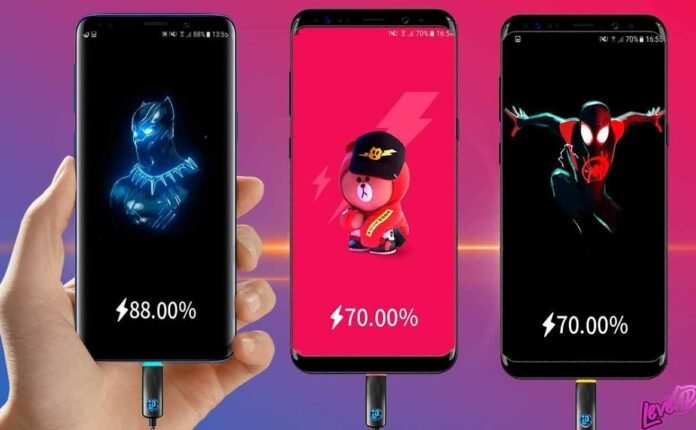
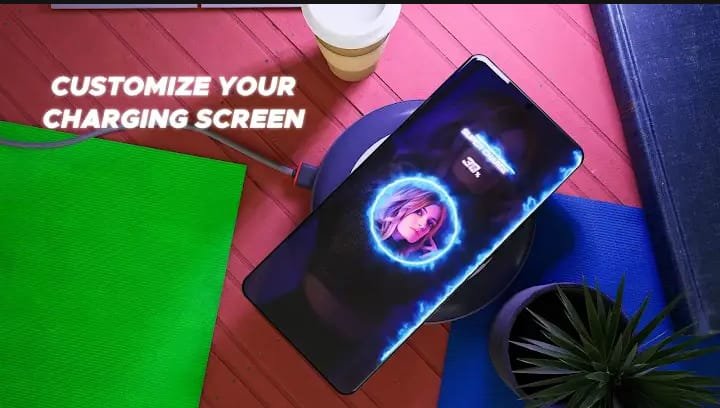
Charging animation refers to a visual effect that appears on your smartphone screen when you connect your device to a charger. Instead of the standard battery icon, the phone displays animated graphics such as neon lines, colorful battery bars, or dynamic energy waves.
These animations are usually created using charging animation apps available for Android and sometimes iOS devices. They enhance the look of your device and make the charging process more visually interactive.
Charging animations can include:
-
Animated battery indicators
-
Glowing charging effects
-
Live wallpapers during charging
-
Custom themes and graphics
-
Sound effects when the charger is plugged in
Many modern charging animation apps also allow users to customize the animation according to their preferences.
How Charging Animation Works
Charging animation works by detecting when your phone is connected to a power source. Once the charging cable is plugged in, the app automatically launches a special animation on the screen.
Here’s how the process typically works:
-
Install a charging animation app from the app store.
-
Grant necessary permissions, such as overlay access.
-
Select your preferred animation style from the app library.
-
Plug in the charger, and the animation will appear automatically.
These apps use your phone’s screen overlay feature to display animations on top of the lock screen or home screen while charging.
Key Features of Charging Animation Apps
Charging animation apps come with many exciting features that improve the overall user experience.
1. Custom Charging Effects
Most apps allow you to choose from dozens or even hundreds of charging animations. You can select themes such as:
-
Lightning energy effects
-
Neon battery indicators
-
Futuristic charging graphics
-
Minimal battery progress bars
2. Battery Level Indicators
Some charging animations show real-time battery percentage with animated progress bars. This helps users easily track how fast their device is charging.
3. Customizable Themes
Users can personalize colors, shapes, and animation styles. This allows you to match the charging animation with your phone’s wallpaper or theme.
4. Charging Sound Effects
Many apps include optional sound alerts when the charger is connected or disconnected.
5. Live Charging Wallpapers
Some advanced apps provide animated wallpapers that activate only during charging, making the screen look dynamic and modern.
Benefits of Using Charging Animation
Charging animation apps offer more than just visual appeal. They also provide several practical benefits.
Better Charging Experience
Instead of a boring charging screen, you get visually appealing animations that make the experience more enjoyable.
Easy Battery Monitoring
Many charging animations display battery percentage clearly, allowing users to monitor charging progress quickly.
Device Personalization
Charging animations help customize your smartphone and make it stand out from standard devices.
Fun and Interactive Interface
Animated effects add an element of creativity and entertainment to everyday phone usage.
Tips for Choosing the Best Charging Animation App
Not all charging animation apps are created equal. Some may consume too much battery or show excessive ads. Here are some tips to choose the best one:
Check App Reviews
Always read user reviews and ratings before installing a charging animation app. High ratings usually indicate better performance.
Look for Low Battery Usage
Choose apps that are optimized to consume minimal battery power.
Avoid Too Many Ads
Some free apps contain heavy advertisements that can affect the user experience.
Ensure Device Compatibility
Make sure the app supports your smartphone model and operating system.
Test Multiple Animations
Good apps offer a variety of animation styles so you can experiment and choose your favorite.
Popular Types of Charging Animations
Charging animation apps usually offer several animation categories, including:
-
3D battery charging effects
-
Neon charging rings
-
Energy wave animations
-
Minimal charging bars
-
Gaming-style charging visuals
These styles allow users to create a unique and visually appealing charging screen.
Are Charging Animation Apps Safe?
Most charging animation apps are safe if downloaded from trusted sources like official app stores. However, users should:
-
Avoid apps requesting unnecessary permissions
-
Install apps from reputable developers
-
Keep apps updated to the latest version
Following these precautions ensures a safe and smooth experience.
Conclusion
Charging animation is a creative way to make your smartphone more exciting and personalized. With colorful visual effects, customizable themes, and real-time battery indicators, charging animation apps transform a simple charging screen into an engaging experience.
Download
Download
Download
Whether you enjoy futuristic designs, neon battery bars, or minimal animations, there are plenty of options available to match your style. By choosing a reliable charging animation app and customizing it according to your preferences, you can make every charging moment visually enjoyable.